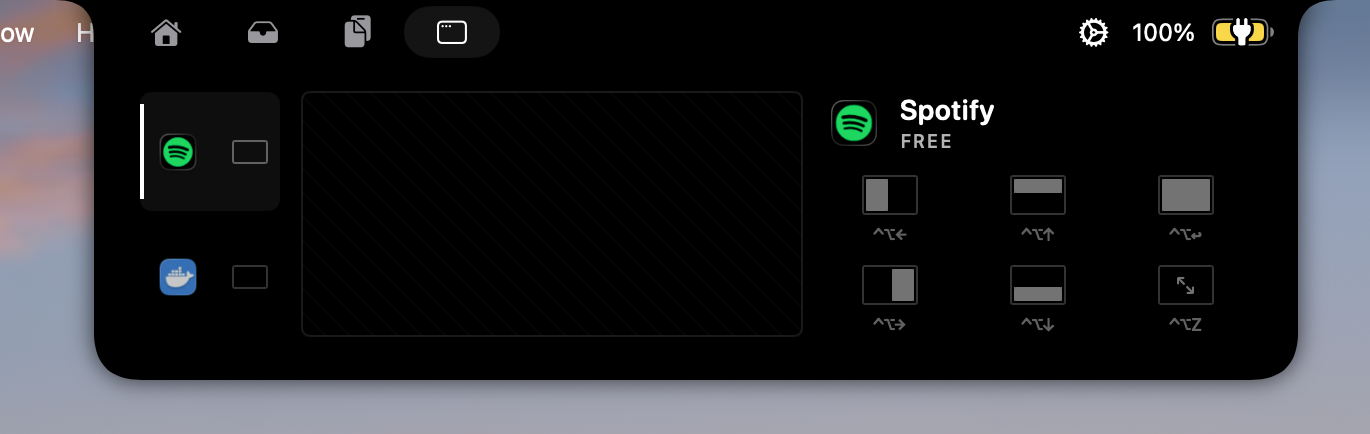
What it does
Gojo’s window controls help you inspect open windows, bring one forward, and quickly snap a window when your workspace needs a reset.
Why it is useful
It is useful when you are moving among several documents or apps and want visual window control close to the top of the screen.
Good to know
Window operations require macOS Accessibility permission; some apps or windows may limit what can be moved or resized.
How Window controls works in Gojo
- Preview and focus open windows
- Quick window snapping
- Uses Accessibility-trusted operations for window actions
One workspace, not another standalone utility
Window controls is one part of Gojo’s MacBook-notch workspace. Keep the tools you use visible, hide the rest, and reach media, windows, clipboard, files, display controls, and more from the same native surface.
Try it on your Mac
Put window controls one hover away.
Try every Gojo feature free for three days. No account or card required.
Signed & notarized · macOS 14+ · private by design